
Play Geometry Arrow Online
Play Geometry Arrow online and test your timing, precision, and reflexes in a fast-paced wave-style arcade challenge. Guide the arrow through narrow paths, avoid obstacles, and learn to control every movement as the difficulty increases. The game is designed for quick browser sessions, with simple controls that are easy to understand but challenging to master.
Geometry Arrow
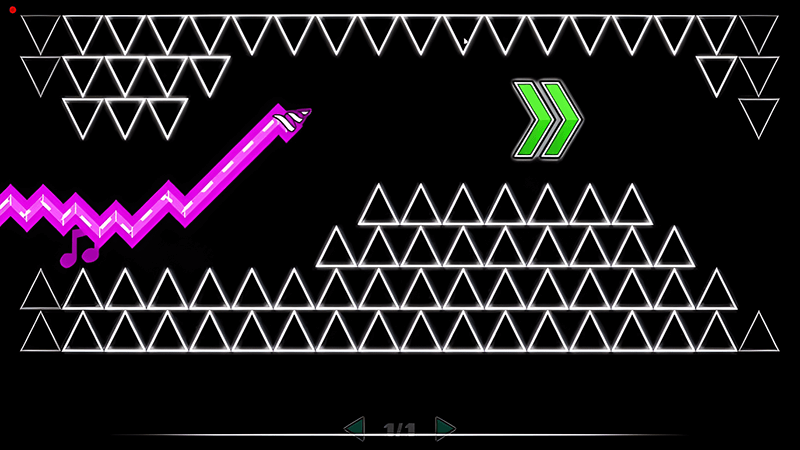
Guide the arrow through a zigzag path, control its movement carefully, and avoid spikes and other obstacles as you progress.
How to Play Geometry Arrow
Geometry Arrow is based on simple movement but requires careful timing and consistent control. Your goal is to guide the arrow through a continuously changing path while avoiding spikes and other obstacles. The arrow moves forward automatically, so your main task is to control its vertical movement and react to upcoming sections of the level.
The key is to avoid making large or unnecessary movements. Short, controlled inputs make it easier to stay in the safe part of the path. As the level becomes more difficult, obstacles appear closer together and require faster reactions. Watching the path ahead instead of reacting only to the obstacle directly in front of you can help you prepare earlier.
If you fail a section, try to remember the timing and movement pattern that caused the mistake. Repeating difficult sections is an important part of learning the game. With practice, you can gradually improve your reaction time and complete sections that initially seem difficult.
Geometry Arrow Controls
The controls in Geometry Arrow are designed to be simple so that you can focus on timing and obstacle avoidance.
Desktop
Left-click the mouse, or press Space / Up Arrow, to move the arrow upward. Release to move downward. Hold to glide along open ceiling sections when space allows.
Mobile
Tap the screen to move the arrow upward and release to move downward. Tap and hold for longer lift sections when the layout requires it.
Geometry Arrow Tips and Strategies
Make Small Movements
Avoid overcorrecting when the arrow is already in a safe position. Smaller movements can make it easier to maintain a stable path.
Look Ahead
Try to recognize the next obstacle before reaching it. Reacting early gives you more time to adjust your movement.
Learn the Rhythm
Some sections become easier when you recognize their movement pattern. Pay attention to repeated sequences instead of treating every obstacle as a completely new situation.
Stay Consistent
Random or excessive movements can quickly lead to mistakes. Develop a consistent input rhythm and adjust it when the level requires a different approach.
Practice Difficult Sections
Failure is part of the learning process. When you repeatedly fail at the same section, focus on what happens immediately before the mistake and change one part of your timing at a time.
Geometry Arrow vs Geometry Dash
Geometry Arrow and Geometry Dash share an interest in fast reactions, obstacle avoidance, and rhythm-based gameplay, but they offer different gameplay experiences. Geometry Arrow focuses heavily on wave-style movement and simple directional control, while Geometry Dash includes multiple gameplay modes, level mechanics, and a much broader level-creation ecosystem.
| Feature | Geometry Arrow | Geometry Dash |
|---|---|---|
| Main gameplay | Wave-style movement | Rhythm platforming |
| Core challenge | Timing and movement control | Timing, jumping and obstacle avoidance |
| Controls | Simple directional input | Multiple control mechanics |
| Level variety | Focused gameplay | Broad level ecosystem |
| Learning curve | Easy to understand | Can become highly complex |
| Best for | Quick reflex challenges | Longer rhythm-platforming sessions |
If you enjoy simple controls and wave-style movement, Geometry Arrow provides a focused challenge. If you prefer multiple gameplay mechanics and a larger level ecosystem, Geometry Dash offers a broader experience.
About Geometry Arrow
Geometry Arrow is a fast-paced browser game centered around wave-style movement and obstacle avoidance. Instead of relying on a complicated control system, the game places the focus on timing, precision, and reaction speed. Players guide an arrow through narrow paths while attempting to avoid spikes and other hazards.
The simple control scheme makes the basic gameplay easy to understand, while increasingly difficult sections provide a challenge for players who want to improve their timing and consistency. Its short-session format also makes it suitable for players looking for a quick browser game without a complicated setup.
Frequently Asked Questions
What is Geometry Arrow?
Geometry Arrow is a browser-based arcade game focused on wave-style movement, timing, and obstacle avoidance.
Can I play Geometry Arrow online?
Yes. You can play the browser version directly on this page when the game is available.
Is Geometry Arrow free to play?
The version provided on this site is available to play online without requiring a paid game purchase.
Is Geometry Arrow similar to Geometry Dash?
They share some visual and gameplay concepts, particularly fast movement and obstacle avoidance, but their core mechanics are different.
Can I play Geometry Arrow on mobile?
If the game version supports touch controls and your device is compatible, you can play it on a mobile browser.
Why is Geometry Arrow difficult?
The game requires precise timing and quick reactions. Small movement errors can cause the arrow to hit an obstacle, especially in narrow sections.
How can I get better at Geometry Arrow?
Focus on controlled movements, look ahead at upcoming obstacles, and practice difficult sections until their timing becomes familiar.
More Geometry Games
Related titles with similar wave, rhythm, or reflex-focused gameplay.


Other Browser Games


Browse the full list on New Games.
About GeometryArrow.info
GeometryArrow.info is a browser gaming website focused on Geometry Arrow and related arcade and rhythm-style games. We provide game information, gameplay explanations, controls, tips, and links to related titles so players can quickly understand a game before playing it.
Our goal is to make browser games easier to discover and play while providing useful information alongside the games themselves. We organize listed titles into relevant collections to make navigation easier. For feedback, email info@geometryarrow.info.